 Google Ads Transparency Center tutorial
How to Filter Google Ads Transparency Center by Region
Use the region selector in Google Ads Transparency Center to set the market you want to inspect, then search an advertiser or website and read the regional transparency context without treating it as campaign-performance data.
Quick answer
The quick answer
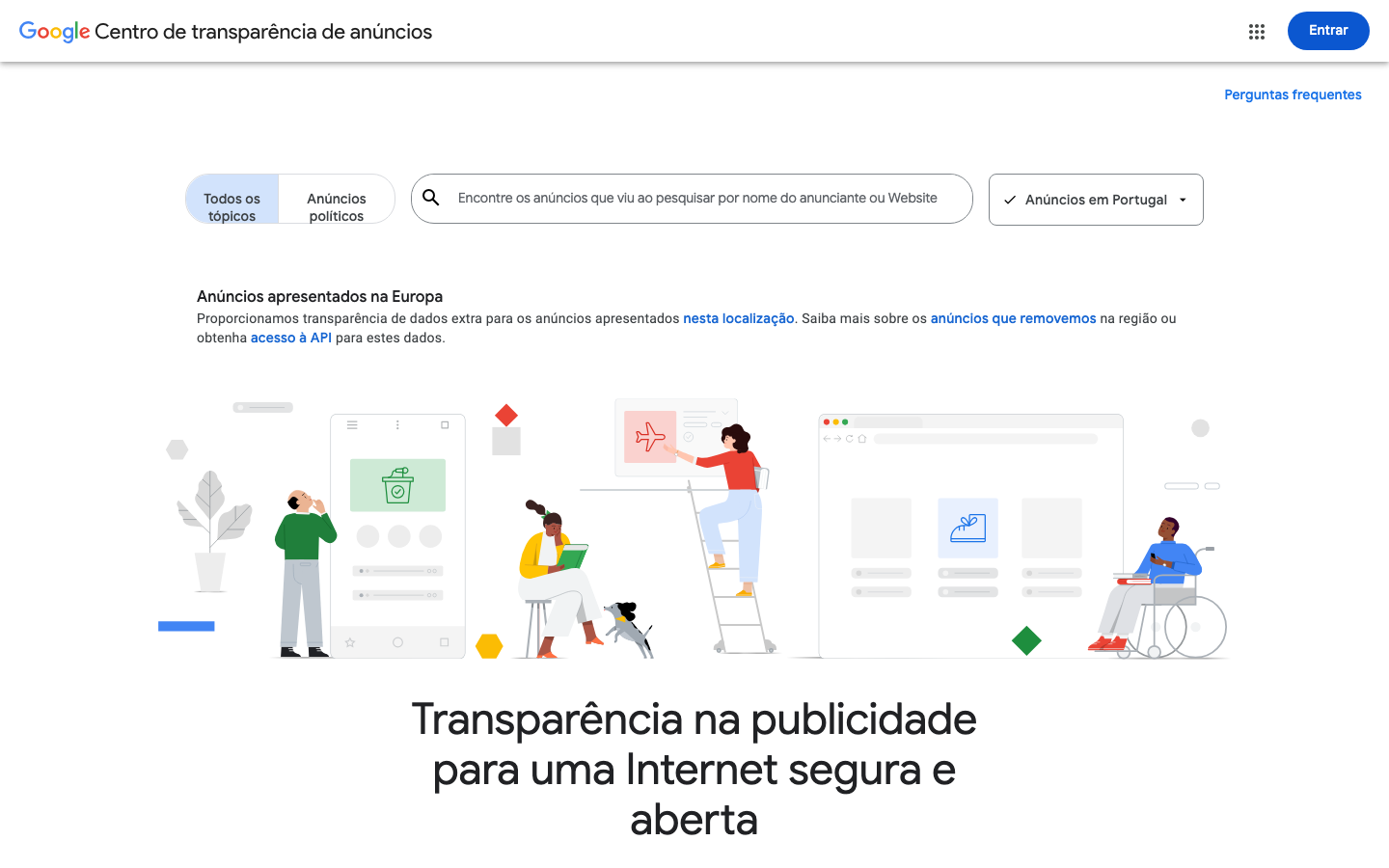
Open Google Ads Transparency Center and use the region selector beside the search field to choose the market you want to inspect. Then search by advertiser name or website, select the correct advertiser where necessary, and review the available records in that regional context. Google identifies additional transparency information for ads shown in Europe and Türkiye, but the selector does not expose a competitor’s targeting, budget, conversions, or complete campaign history.
Visual guide
The Google Ads Transparency Center path
Click through the real product screens used in the steps below.
Step-by-step
How to Filter Google Ads Transparency Center by Region
- 01
Open Google Ads Transparency Center
Start at Google Ads Transparency Center, Google’s public surface for searching supported ads shown through Google. It is useful for checking public advertiser and creative records, not for opening a competitor’s Google Ads account or measuring campaign results.
- 02
Set the region before searching
Use the region selector beside the search field and choose the market you need to examine. Treat this as the context for your research: if your brief concerns a particular country, set that country before saving examples or comparing advertisers. Do not assume that the default selection represents another market.
- 03
Search by advertiser name or website
Enter the advertiser name when you know the company behind the ads, or enter its destination website when the advertiser identity is unclear. Google says a website search can return more than one advertiser account with ads pointing to that domain, so select the account that actually matches the company you are researching.
- 04
Review available ads in the chosen market context
Open the advertiser and inspect the available ad records relevant to your question. Google says its covered records are ads shown at least once across Search, Display, YouTube, and DV360 in supported formats. That is public transparency coverage, not proof that you are seeing every ad, every format, or every campaign an advertiser has used in that market.
- 05
Separate regional transparency details from performance claims
Google says ads shown in Europe and Türkiye can include additional transparency information, such as the ad topic and more audience-selection details. Record only what the selected view actually shows, together with the region and date checked. Do not infer a competitor’s budget, full targeting setup, impressions, conversions, or profitability from a public record.
Read the report
What the main metrics mean
Selected region
The country or regional view chosen in the Transparency Center. Record it with your notes because it sets the context for the public view you inspected.
Advertiser
The advertiser record selected after a name or website search. Confirm the identity before attributing an available ad to a competitor.
Available ad record
A public record for a supported ad shown through Google. It supports a narrow observation about that displayed record, not a conclusion about campaign performance.
Regional transparency information
Extra information Google says may be available for ads shown in Europe and Türkiye, including an ad topic and more audience-selection details. Availability can vary by location and by the record shown.
Before you continue
- Set and record the market you are researching before you save any examples.
- Confirm the advertiser identity, especially when a website search returns several accounts.
- Treat the selected regional view as a transparency context, not proof of a complete regional media plan.
- Keep visible creative and regional disclosures separate from assumptions about spend, targeting, reach, conversions, or profit.
FAQ
Common questions
Can I filter Google Ads Transparency Center to see every ad a competitor ran in one country?
No. The region selector sets the market context for the Google Ads Transparency Center view, but Google describes the Center as a public record of supported ads shown through Google, not a complete archive of every campaign or format a competitor ran in that country.
Why does Google Ads Transparency Center show extra information for European ads?
Google says ads shown in Europe and Türkiye can include additional transparency information because of regional regulations, including the ad topic and more audience-selection details. The exact information can vary by location and by the public ad record you open.
Do I need a Google Ads account to use the Google Ads Transparency Center region filter?
No. Google Ads Transparency Center is a public search surface, so you can select a region and search by advertiser name or website without access to the competitor’s Google Ads account.
Can an agency use the regional view to estimate a competitor’s Google Ads spend?
No. A regional Google Ads Transparency Center view does not publish a competitor’s budget, impressions, conversion data, profitability, or full targeting setup. It can support a reproducible observation about a public ad record in a selected market, not a spend estimate.
What should I save when checking a competitor’s Google ads by region?
Save the selected region, advertiser identity, visible creative, any public regional transparency details, and the date checked. Those details let a teammate reproduce the lookup without overstating what the public record proves.
Sources and further reading
This guide was checked against Google Ads Transparency Center product documentation:
 Reviewed by Filipe Lins DuarteCo-Founder & CEO
Vast experience talking to customers and users to understand what good software looks like. Background spans commercial and product roles.
 Checked by John RiceCo-Founder & CTO
15+ years building tech products and web applications. Conducted hundreds of user interviews to know what a good product looks like.
Every Marketraa page follows our editorial standards.