 Google Ads Transparency Center tutorial
How to See a Competitor's YouTube Ads
Use Google Ads Transparency Center to search a competitor by advertiser or website, filter the available records to YouTube, and inspect the public ad details without mistaking them for spend or performance data.
Quick answer
The quick answer
Open Google Ads Transparency Center and search the competitor by advertiser name or website. Select the matching advertiser, apply the YouTube platform filter, and open the available ad records to inspect their public creative and advertiser details. Google says the platform filter only includes ads shown from September 4, 2023, so remove it when you need to check older available records. A visible YouTube ad is not evidence of its spend, audience, conversion rate, or current campaign status.
Visual guide
The Google Ads Transparency Center path
Click through the real product screens used in the steps below.
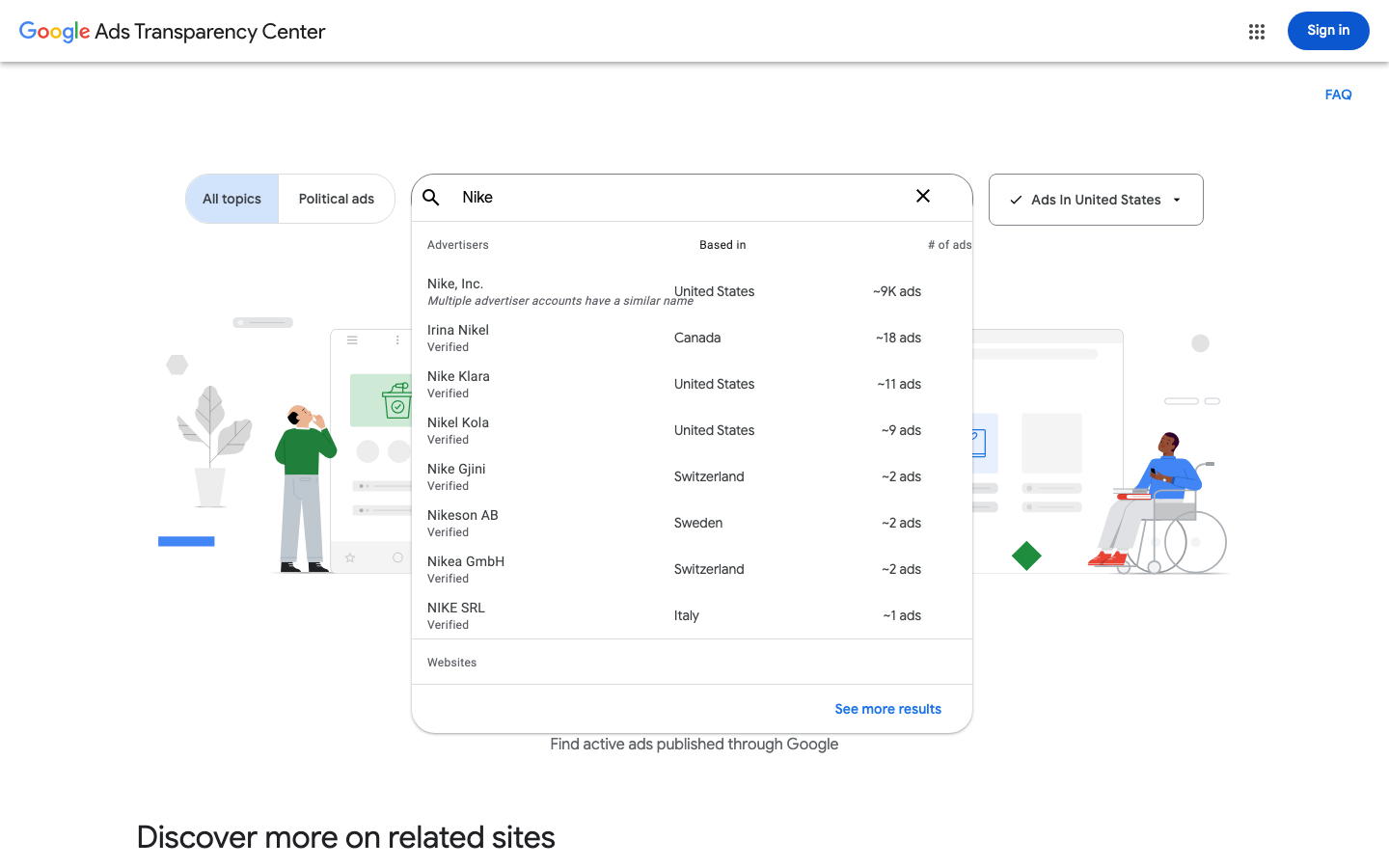
Step-by-step
How to See a Competitor's YouTube Ads
- 01
Open Google Ads Transparency Center
Go to Google Ads Transparency Center. It is a public lookup surface for ads shown through Google in supported formats, rather than a Google Ads account report. That distinction matters: you can inspect public records, but you cannot see a competitor’s account settings or results.
- 02
Search by the advertiser name or website
Enter the company name when you know the advertiser, or enter the destination website when the advertiser name is unclear. Google says a website result can include several advertiser accounts that have ads pointing to that domain. If that happens, narrow the results to the account that matches the competitor before reviewing creative.
- 03
Select the YouTube platform filter
Open the platform filter and choose YouTube. Google describes its covered inventory as ads shown at least once across Search, Display, YouTube, and DV360 in supported formats. The YouTube filter is the practical way to separate available YouTube records from the advertiser’s other Google inventory.
- 04
Read the filtered list with its date boundary in mind
Google says platform-filtered results only include ads shown on or after September 4, 2023. A filtered list is therefore not a complete history of every YouTube ad a competitor has ever run. If the filtered result is empty or the date matters, remove the platform filter and check the broader available advertiser record before drawing a conclusion.
- 05
Open relevant ad details and record only what is public
Open a relevant ad record to inspect the creative and advertiser details Google makes available. Save the advertiser identity, observed platform, creative, and the date you checked it. Do not turn a public record into a claim about budget, targeting, conversions, or profitability, because the Center does not publish those campaign-level measures.
Read the report
What the main metrics mean
Platform
A filter for available ads shown on a selected Google platform. Choosing YouTube excludes ads shown before September 4, 2023 from the filtered results.
Advertiser
The advertiser record selected after a name or website search. Confirm it before attributing an ad to a competitor, especially when a website returns more than one account.
Available ad record
A public record for a supported ad shown through Google. It confirms that the ad was represented in the Center, not the campaign’s spend, outcome, or targeting setup.
Date checked
The date you inspected the public record. Keep it with saved examples because the available set can change and a filtered view has a stated historical boundary.
Before you continue
- Confirm the advertiser identity before treating a result as a competitor’s ad.
- Use the YouTube platform filter when the question is specifically about available YouTube records.
- Remove the platform filter before concluding that an advertiser has no older available ads.
- Keep creative observations separate from assumptions about spend, targeting, reach, conversions, or profitability.
FAQ
Common questions
Can I see a competitor’s YouTube ads without access to their Google Ads account?
Yes. Google Ads Transparency Center is a public search surface where you can search by advertiser name or website, select the advertiser, and filter available records to YouTube. The public results do not give you access to the competitor’s account or campaign-performance reporting.
Why does the YouTube filter show fewer Google Ads Transparency Center results than the advertiser search?
The YouTube filter shows only the available records tied to YouTube and excludes ads shown before September 4, 2023. Remove the filter to inspect the advertiser’s broader available Google record, but do not assume that either view is a complete campaign archive.
Can an agency use Google Ads Transparency Center to prove a competitor is spending heavily on YouTube?
No. Google Ads Transparency Center does not publish competitor budget, impressions, conversion data, profitability, or full targeting details for ordinary advertiser lookup. A visible ad supports a narrow claim that Google publicly represents that available ad record.
What should I save from a competitor YouTube ad for a creative review?
Save the advertiser identity, the fact that you viewed the record with the YouTube filter, the observed creative, and the date checked. That gives a teammate a reproducible observation without implying that the ad is a top performer or currently receiving a particular level of delivery.
Does Google Ads Transparency Center show every YouTube format a competitor has ever used?
No. Google says the Center represents supported ad formats shown at least once through Google, and the YouTube platform filter excludes ads shown before September 4, 2023. Treat the results as available transparency records, not a complete historical inventory of every format or campaign.
Sources and further reading
This guide was checked against Google Ads Transparency Center product documentation:
 Reviewed by Filipe Lins DuarteCo-Founder & CEO
Vast experience talking to customers and users to understand what good software looks like. Background spans commercial and product roles.
 Checked by John RiceCo-Founder & CTO
15+ years building tech products and web applications. Conducted hundreds of user interviews to know what a good product looks like.
Every Marketraa page follows our editorial standards.