 Meta Ad Library tutorial
How to See How Long a Facebook Ad Has Been Running
See when an active Facebook ad started running in Meta Ad Library, calculate its visible run length, and avoid mistaking a delivery date for a complete campaign history.
Quick answer
The quick answer
To see how long an active Facebook ad has been running, search the advertiser in Meta Ad Library and read the “Started running on” date on its ad card. Count from that date to today for the visible run length, but treat it as a delivery start date, not proof that the advertiser spent continuously or that the creative never changed.
Visual guide
The Meta Ad Library path
Click through the real product screens used in the steps below.
Step-by-step
How to See How Long a Facebook Ad Has Been Running
- 01
Open Meta Ad Library and choose the market you want to inspect
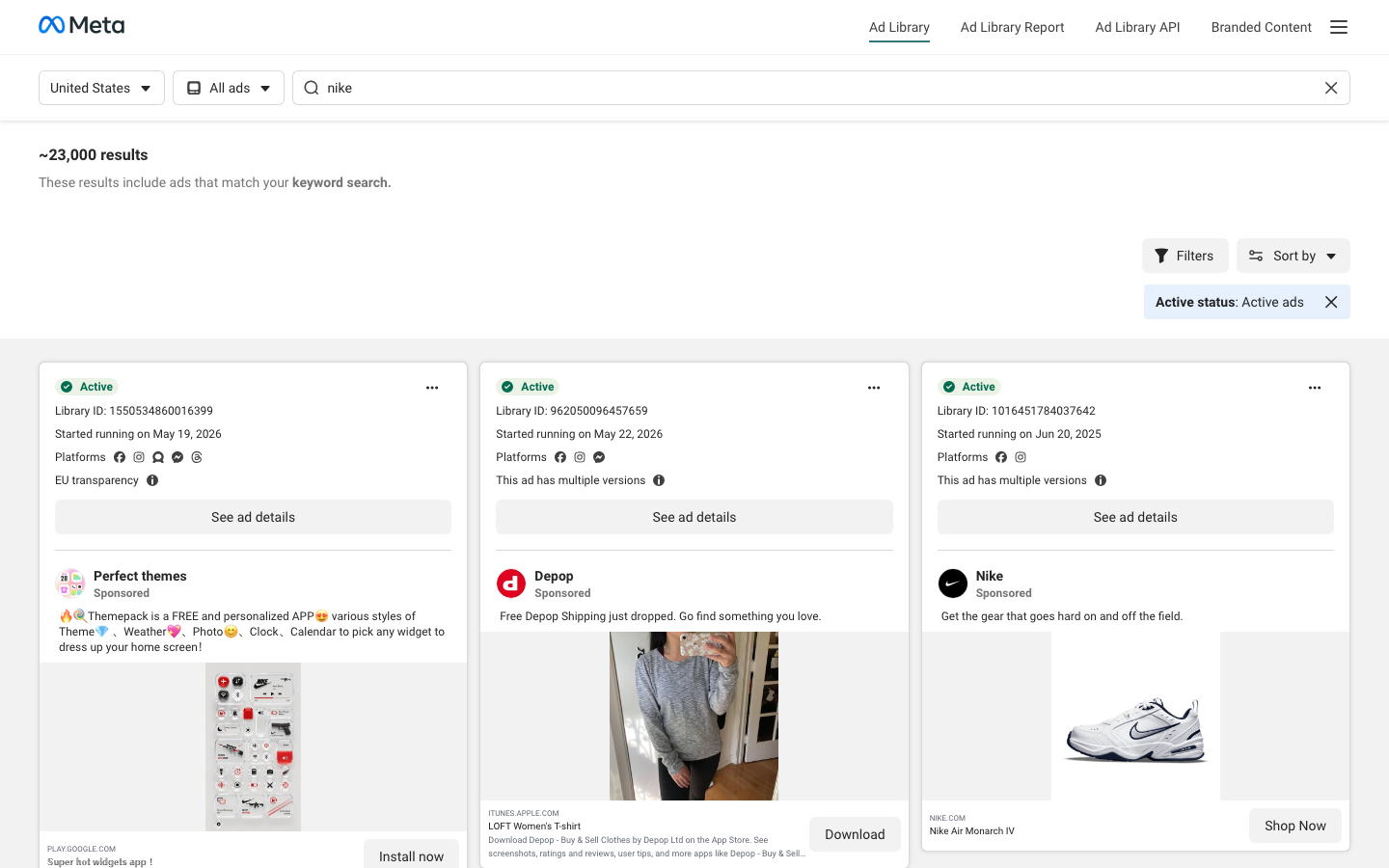
Open Meta Ad Library, select the country relevant to the campaign, and keep the category set to All ads unless you are deliberately researching a regulated category. Country selection matters because an advertiser can deliver different ads in different places, and the library shows records available for the market you selected.
- 02
Search for the advertiser or a distinctive keyword
Use the search field to look for the advertiser or Page first. A keyword search can surface individual messages, but it is less reliable when several advertisers use the same term. Open the advertiser’s result set when you need to compare several pieces of creative from one brand.
- 03
Confirm that the card is active
Look for the Active status on the ad card before using its start date to judge a current run. Meta Ad Library’s standard search is designed around ads currently running across Meta technologies, so an active result is the appropriate record for this question.
- 04
Read the “Started running on” date
Each active result card displays a “Started running on” date beside its Library ID. That is the date to record when you want to know how long the visible ad has been running. If the card says that multiple ads use the same creative and text, treat each listed ad as a separate record until you inspect its own card.
- 05
Calculate the visible run length and save the context
Count the calendar days from the displayed start date through the date you checked the library. Save the Library ID, country, active status, and any platform badges with the date. Those details make the finding reproducible and prevent a later reader from assuming the observation applied to every market or placement.
Read the report
What the main metrics mean
Started running on
The delivery-start date shown on an active ad card. It is the best public reference point for calculating that record’s visible run length.
Active status
Whether the card is currently marked active in the library. Check it before describing an ad as still running.
Library ID
Meta’s identifier for the ad record. Keep it with your notes so another researcher can distinguish similar-looking ads.
Platforms
The Meta surfaces associated with the displayed record. A platform badge does not reveal targeting, bids, conversions, or revenue.
Before you continue
- Record the country selected in the library before comparing two advertisers or two checks made on different days.
- Use the date on the specific ad card, not the date of a similar creative elsewhere in the results.
- Describe the result as a visible run length, not proof of continuous spend or unchanged targeting.
- Do not infer commercial spend, impressions, conversions, or profitability from a standard commercial-ad card.
FAQ
Common questions
Can I tell exactly how many days a competitor’s Facebook ad has been live?
You can calculate the visible run length by counting from the active ad card’s “Started running on” date to the day you check it. That calculation describes the public record you saw, not a guarantee that delivery was uninterrupted throughout the period.
Why does Meta Ad Library show the same Facebook creative more than once?
Meta Ad Library can show multiple ads using the same creative and text, and each ad can have its own Library ID and delivery date. Check each card before concluding that one creative has run for the same length everywhere.
Can I see how long an inactive Facebook ad ran in Meta Ad Library?
Meta’s public retention rules are not the same for every ad type and region, so an inactive commercial ad is not guaranteed to remain available as a worldwide historical record. Meta explicitly describes longer retention for social-issue, election, and political ads, plus stated EU and UK transparency records.
Does a long-running Facebook ad mean the campaign is profitable?
No, a long visible run only shows that Meta lists the ad as having started delivery on an earlier date and currently active when checked. The standard library does not expose an advertiser’s revenue, conversions, bid strategy, or complete campaign results.
Why can’t I find a competitor’s Facebook ad in Meta Ad Library?
An ad may not be running in the country you selected, the advertiser may use a different Page name, or the record may fall outside the library’s applicable retention scope. Start with the advertiser or Page name, then check the selected country before assuming the campaign is absent.
Sources and further reading
This guide was checked against Meta Ad Library product documentation:
 Reviewed by Filipe Lins DuarteCo-Founder & CEO
Vast experience talking to customers and users to understand what good software looks like. Background spans commercial and product roles.
 Checked by John RiceCo-Founder & CTO
15+ years building tech products and web applications. Conducted hundreds of user interviews to know what a good product looks like.
Every Marketraa page follows our editorial standards.