 Meta Ad Library tutorial
How to Search the Meta Ad Library for Competitor Ads
Search Meta Ad Library for a competitor’s active ads by choosing a location and ad category, then looking up the advertiser and checking the creative, status, and delivery details that Meta makes public.
Quick answer
The quick answer
Open Meta Ad Library, set the country where you want to inspect delivery, choose All ads, and search the competitor by advertiser name. Start with the exact brand or Page name, then open the visible ad cards to check the creative, active status, and start date. Treat the results as a view of public ad records, not proof of targeting, spend, conversions, or campaign performance for ordinary commercial ads.
Visual guide
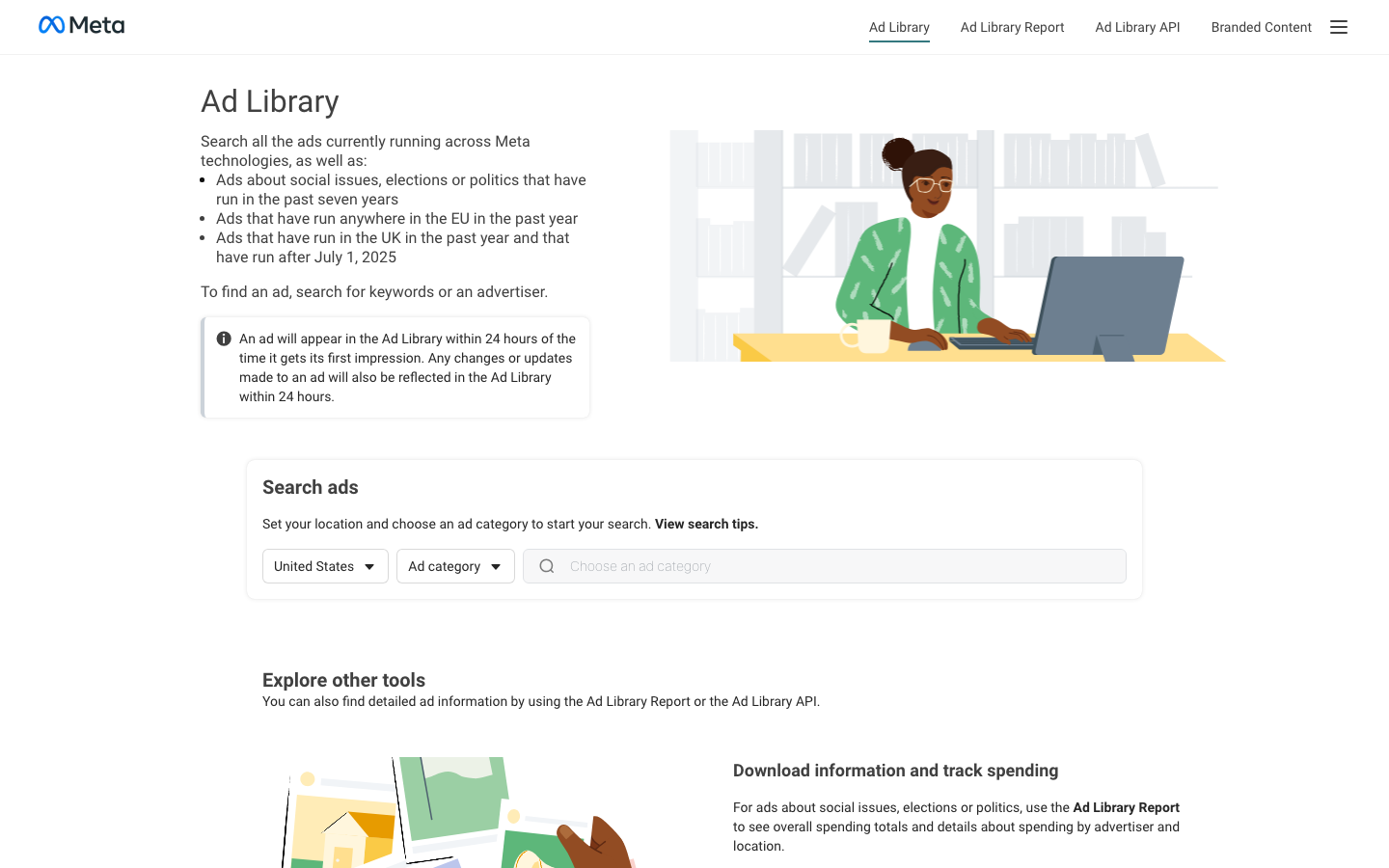
The Meta Ad Library path
Click through the real product screens used in the steps below.
Step-by-step
How to Search the Meta Ad Library for Competitor Ads
- 01
Open Meta Ad Library and choose the country
Go to Meta Ad Library and set the location where you want to inspect ads. This choice matters because the library is a transparency surface with country-specific views. Use the market you are researching, not simply the country where your team works.
- 02
Choose All ads for ordinary competitor research
Choose All ads when the job is to review a competitor’s usual commercial creative. The separate Issues, elections or politics category is for regulated transparency research and has different history and detail rules. Do not expect ordinary commercial ads to behave like the political-ad archive.
- 03
Search by the competitor’s advertiser name
Enter the company, brand, or Page name in the Search by keyword or advertiser field. Start with the cleanest version of the name. If it returns no useful match, try the parent company, a spelling variation, or a distinctive product name, because a campaign may run from a Page name that does not exactly match the brand shown in the ad.
- 04
Confirm that the result is the right advertiser
Check the Page or advertiser name on the result before saving an example. Similar names are common, and a keyword match is not the same as an advertiser match. Once the advertiser is right, scan the visible ad cards for the offer, message, format, and platform placement that answer your research question.
- 05
Open the ad details and record what is actually public
Use the ad card’s details control to inspect the record Meta provides. For competitor creative research, note the ad copy, creative, active status, and delivery date shown. Meta does not make an ordinary advertiser’s conversion results, revenue, bid strategy, or complete targeting setup public in this search, so keep those conclusions out of your analysis.
Read the report
What the main metrics mean
Active status
Whether the ad card is currently marked active or inactive in the library view. An active result is evidence of visible current delivery, not evidence of scale or profitability.
Started running
The delivery-start date shown on an ad card. Use it to distinguish a recently launched message from a creative that has been visible for longer.
Platforms
The Meta technologies shown for the ad. This identifies displayed placement context, not the full media plan or every audience that received the ad.
Library ID
The identifier Meta displays for an individual ad record. Keep it with a saved observation when your team needs to return to the same public record.
Before you continue
- Use the country that matches the competitor market you are investigating.
- Confirm the advertiser or Page name before attributing an ad to a competitor.
- Separate observations about visible creative from assumptions about performance or targeting.
- Record the active status and delivery date with each example so the research stays time-bound.
FAQ
Common questions
Can I search Meta Ad Library for a competitor without a Meta Ads account?
Yes. Meta’s public Ad Library lets you search currently running ads by keyword or advertiser without access to the competitor’s ad account.
Why can’t I find a competitor in Meta Ad Library when I search their brand name?
A missing Meta Ad Library result can mean the competitor has no visible ads in the selected country or is advertising from a different Page or advertiser name. Try the company’s parent brand, product name, and known Facebook Page name before concluding that it is not advertising.
Does Meta Ad Library show how much a competitor spends on Facebook and Instagram ads?
Meta Ad Library does not show ordinary commercial competitors’ spend as part of a general advertiser search. Meta’s Ad Library Report is the relevant public spending surface for ads about social issues, elections, or politics.
Can I see a competitor’s old Facebook ads after they stop running?
You cannot assume that a stopped commercial ad will remain available as a worldwide historical record. Meta explicitly describes longer retention for social-issue, election, and political ads, plus stated EU and UK transparency records.
What should I copy from a Meta Ad Library competitor search into an ad brief?
Copy the observable elements: advertiser name, country, active status, start date, creative format, offer, message, and Library ID where shown. Do not label an ad a winner or infer its targeting, spend, or conversion performance from the public card alone.
Sources and further reading
This guide was checked against Meta Ad Library product documentation:
 Reviewed by Filipe Lins DuarteCo-Founder & CEO
Vast experience talking to customers and users to understand what good software looks like. Background spans commercial and product roles.
 Checked by John RiceCo-Founder & CTO
15+ years building tech products and web applications. Conducted hundreds of user interviews to know what a good product looks like.
Every Marketraa page follows our editorial standards.